GitHub Actions Deployment Pipeline to Kubernetes
Secure your pipeline with SHA tags, OIDC auth, and rollout verification.
A GitHub Actions deployment pipeline to Kubernetes is easy to describe and harder to trust. Building, pushing, and deploying an image is the basic job. Reliability comes from securing the credentials, identifying the exact image, and waiting for the cluster to prove the rollout worked. Without those controls, a workflow can be green even when the deployment has failed.
What the build-push-deploy pipeline actually does, step by step
A git push triggers a workflow, and a GitHub Actions runner executes its jobs. The build job uses docker/build-push-action@v7 to build, tag, and push a container image. That image lands in a container image registry, including GCR/Artifact Registry, ECR, or ACR. The deploy job then changes the live cluster with kubectl set image, or applies the equivalent change through a configuration customization tool or Helm. Finally, kubectl rollout status gates the workflow’s success on the rollout completing.
The workflow YAML connects those operations, but each connection carries a separate responsibility. The build step must produce the intended image, the push must put it where the cluster can retrieve it, and the deploy step must select it correctly. When build and deploy run as separate jobs, they pass the image tag through job outputs. Authentication gives the runner permission to cross those boundaries.
This is a push-based pipeline because the runner mutates the cluster directly. It fits a single cluster or a small multi-cluster setup run by a small backend or platform team. Its apparent simplicity is useful, but it does not distinguish a reliable setup from a fragile one. The same three steps appear in both, and the differences live inside their handoffs.
Why authentication is the first place the pipeline silently breaks
The first handoff depends on a trust relationship between GitHub Actions and the cluster environment. A bad Workload Identity binding or an expired OIDC audience can remain unnoticed until the next deploy. By then, credentials may already have been distributed. The failure may appear as a generic authentication error rather than a clear explanation of the broken trust configuration. So a workflow that ran yesterday says little about whether its credentials have the right scope today.
A base64-encoded kubeconfig stored as a GitHub Secret is a practical starting point. That credential rotates only when someone remembers to rotate it.
OIDC changes the authentication model, but its configuration still determines the boundary. OneUptime’s EKS deployment guide uses aws-actions/configure-aws-credentials with a role ARN, followed by aws eks update-kubeconfig. The GKE equivalent uses google-github-actions/auth@v3 with a workload_identity_provider and a scoped service account. An audience mismatch between the provider configuration and the workflow’s identity-token permissions can still fail without naming the audience as the cause.
It is safer to give each environment one namespace and one service account, with separate OIDC trust relationships for staging and production. A cluster-admin binding across all namespaces lets a compromised runner token mutate workloads far beyond its intended target. Reusing that access across environments turns one leaked token into a cross-environment risk.
Image tagging and the failure mode it hides at deploy time
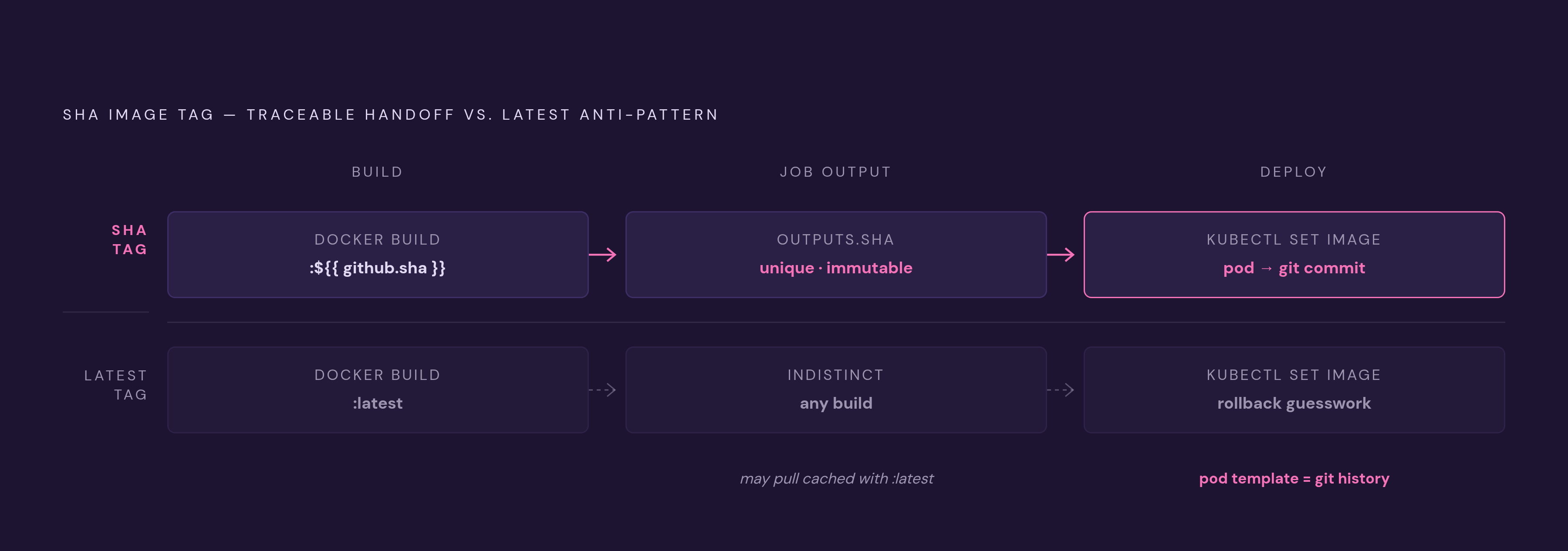
Once the runner can authenticate, the next question is what it tells the cluster to run. The image tag is the handoff artifact between build and deploy. In this pipeline, the deploy step relies on that tag to select the image. If the tag does not distinguish builds, a successful command can select the wrong image or leave the previous one running.
Tagging every build latest creates exactly that ambiguity. Neither kubectl set image nor helm upgrade --set image.tag=latest can distinguish the current build from the previous one through the tag alone. Without imagePullPolicy set to Always, a node may serve its cached image. Even when the pull works, rollback takes guesswork because the tag does not point to a specific previous build. Successful delivery to the registry is not proof of correct selection in the cluster.
The correct convention is to tag each image with the full commit SHA, ${{ github.sha }}, and keep that build reference immutable. OneUptime’s deployment guide passes the SHA tag from the build job to the deploy job through job outputs. This makes the reference unique and traceable to the commit that produced it. It also gives each changed image a distinct pod template, so the ReplicaSet history used by kubectl rollout undo maps to git history.
Release tags can sit on top of that convention without replacing it. A release pipeline can add a v1.2.3 semver tag through Release Please or an equivalent process. It should promote the SHA-tagged image that was already built rather than build it again, so the image shipped is the same one that was tested.
Rollout verification and why a green workflow does not mean a healthy deployment
Selecting the right image still does not prove that it runs. A deploy step can exit 0 as soon as kubectl apply returns, before new pods have been scheduled, images pulled, or readiness probes passed. The cluster may still be rolling out, be stuck, or be going into CrashLoopBackOff.
kubectl rollout status deployment/myapp closes that gap by waiting for the rollout to complete. If completion does not happen within the timeout, the command exits non-zero and fails the workflow. The deployment is not called done merely because the API accepted the change.
Helm offers a similar gate through helm upgrade --wait --timeout 5m, but the readiness conditions are not identical. Helm’s legacy --wait can return when new pods are ready while the old ReplicaSet still has active pods. kubectl rollout status also waits for the old ReplicaSet to scale to zero. Using both is redundant but not harmful, so pick one and apply it consistently.
Waiting after mutation does not replace a gate before mutation. An environment approval or smoke test can separate the completed image build from the production change. Without a separate gate, the push-based chain carries a bad image straight into the cluster.
How action version pinning and Kubernetes version skew interact as a hidden breakage vector
Even when a pipeline has the right credentials, tags, and rollout checks, its dependencies can change while the application code stays the same. GitHub Actions runner runtimes follow one schedule, while Kubernetes API server versions follow another. A workflow can end up outside either supported window. Its YAML may look unchanged even as the conditions under which it runs have shifted.
The recommended Node 24 combination as of August 2026 is checkout@v7, build-push-action@v7, and google-github-actions/auth@v3. Those version tags identify releases, but they do not freeze the code being executed. A maintainer can repoint a tag and silently change what the next run receives. Pinning an action to a full commit SHA makes that dependency reproducible and also blocks the tag-repointing attack covered in the next section.
The runner’s kubectl version needs a separate pin. The client must be no more than one minor version ahead of or behind the Kubernetes API server. Installing latest on the runner while the cluster stays unchanged can put the client outside that window and make the API behave in unexpected ways. An unmaintained workflow can therefore encounter both an Actions runtime removal and a Kubernetes API deprecation without an application change.
Pin kubectl to a specific version that matches the cluster’s minor version.
Supply-chain attacks targeting the pipeline itself, and the controls that stop them
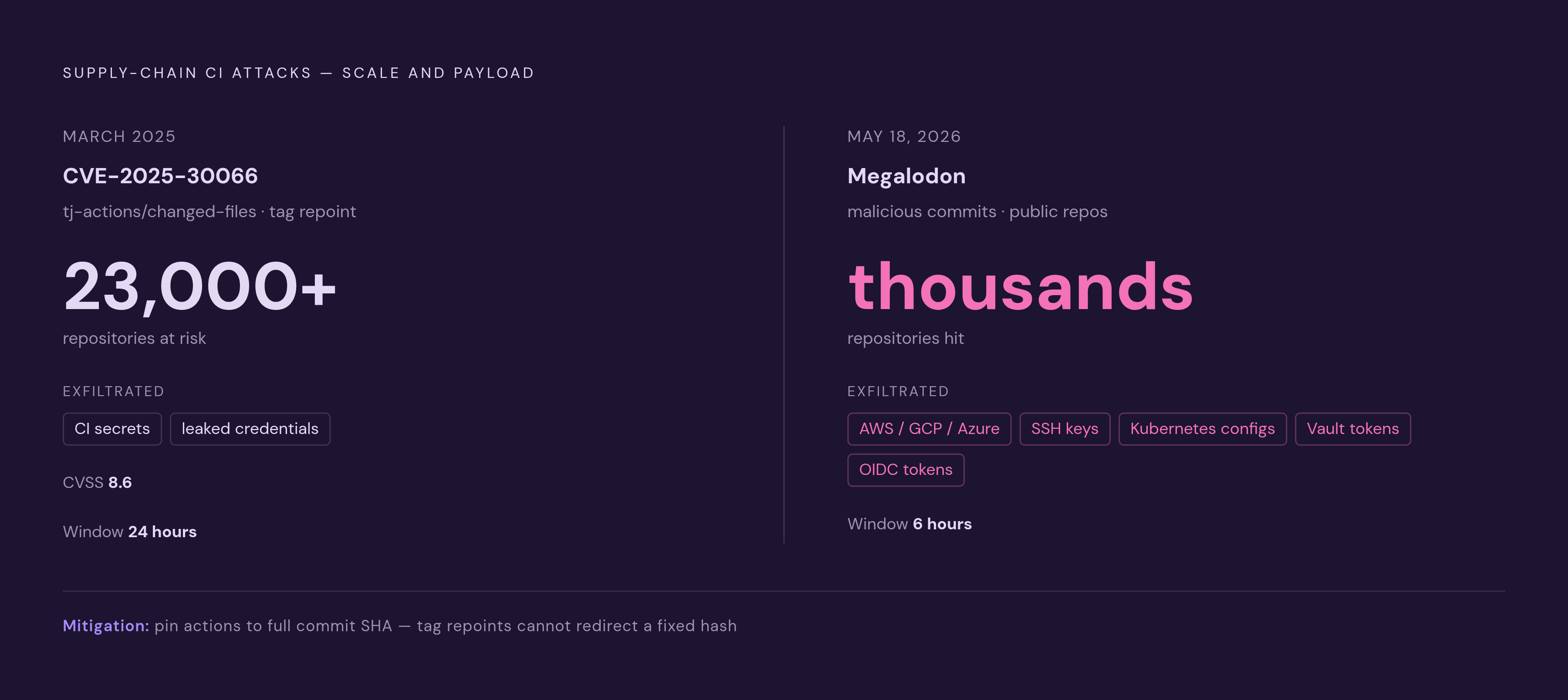
Version changes can break a pipeline by accident, but recorded attacks show that attackers also target those same dependencies. A deployment runner has access that is valuable to attackers, including cloud credentials, Kubernetes configs, and registry tokens. CVE-2025-30066, with a CVSS score of 8.6, involved the compromise of tj-actions/changed-files through tag repointing. More than 23,000 repositories used the action and were at risk, while a materially smaller subset was confirmed to have leaked secrets during a single 24-hour window in March 2025. Exposure at that scale is not the same as confirmed leakage, but both matter.
The Megalodon campaign on May 18, 2026 targeted workflow files themselves. It pushed thousands of malicious commits into thousands of public GitHub repositories in a six-hour window. The injected workflows exfiltrated CI secrets, AWS, GCP, and Azure credentials, SSH keys, Kubernetes configs, Vault tokens, and Actions OIDC tokens.
Pin every third-party action to a full commit SHA. That directly prevents the tag-repointing mechanism used in the tj-actions/changed-files incident. The TanStack chain required both pull_request_target and identity-token write permission, so use that trigger only when necessary and never grant it that permission. Scope OIDC trust to specific branches and environments, and use GitHub Environments with required reviewers to gate production deployments.
Scanning supplements those access controls. Trivy covers container CVEs and IaC misconfiguration, while Checkov covers Kubernetes manifest misconfiguration. CodeQL or Semgrep provides SAST. Daily or weekly scheduled scans also catch newly disclosed CVEs in images that have already shipped.
When to hand the deploy step to a GitOps controller instead of GitHub Actions
These controls make a push-based pipeline safer, but they do not change its dependence on a trigger. GitHub Actions deploys only when the workflow runs. If the runner cannot reach the cluster or nobody re-triggers the workflow, the cluster stays on its old state. The pipeline has no continuous loop that detects and corrects that drift.
A pull-based setup gives that loop to a controller inside the cluster. ArgoCD or Flux compares the live state with a git-sourced desired state and reconciles the difference. GitHub Actions still builds and pushes images, but it no longer changes the live cluster itself.
GitHub Actions alone can be sufficient for one cluster, infrequent deploys, and a low blast radius. A small team may not yet have a reason to absorb the operational cost of a GitOps controller. Three or more clusters, a need for drift self-correction, or an audit trail independent of CI runner availability are reasons to split CI from CD. That split is an evolution in deployment ownership.
Ownership must nevertheless be exclusive. If GitHub Actions directly changes a cluster that ArgoCD also reconciles, both systems act as the authority for live state. The result can be reconciliation conflicts in production. Assign the deploy step to exactly one system.
What this pipeline looks like running on infrastructure a small team actually owns
A team that owns the cluster also owns node OS patches, Kubernetes minor-version upgrades, CNI and ingress maintenance, and the on-call rotation for those responsibilities. Workflow YAML cannot remove that work. The pipeline’s reliability ceiling is set by the infrastructure receiving its deployments.
Upgrade work is particularly easy to undercount. Kubernetes requires minor-version upgrades to happen sequentially. With each cluster upgrade, the team also needs to check the runner’s client and action versions together to make sure they meet the compatibility constraints described earlier. On most managed services, node OS CVE patches apply automatically only if that has been set up.
Control-plane charges also differ, which matters to teams that need to keep costs down. EKS charges $0.10/hour per cluster. GKE Autopilot has the same $0.10/hour cluster management fee as Standard, with the first eligible cluster offset by a $74.40/month free tier credit. AKS offers a free control-plane tier. Those differences compound across multiple clusters, but they do not answer who will keep the deployment target healthy.
For a team under ten engineers with no one dedicated to platform work, that question decides the choice. The useful comparison is not simply Kubernetes or no Kubernetes, but who absorbs the ongoing operational commitment.